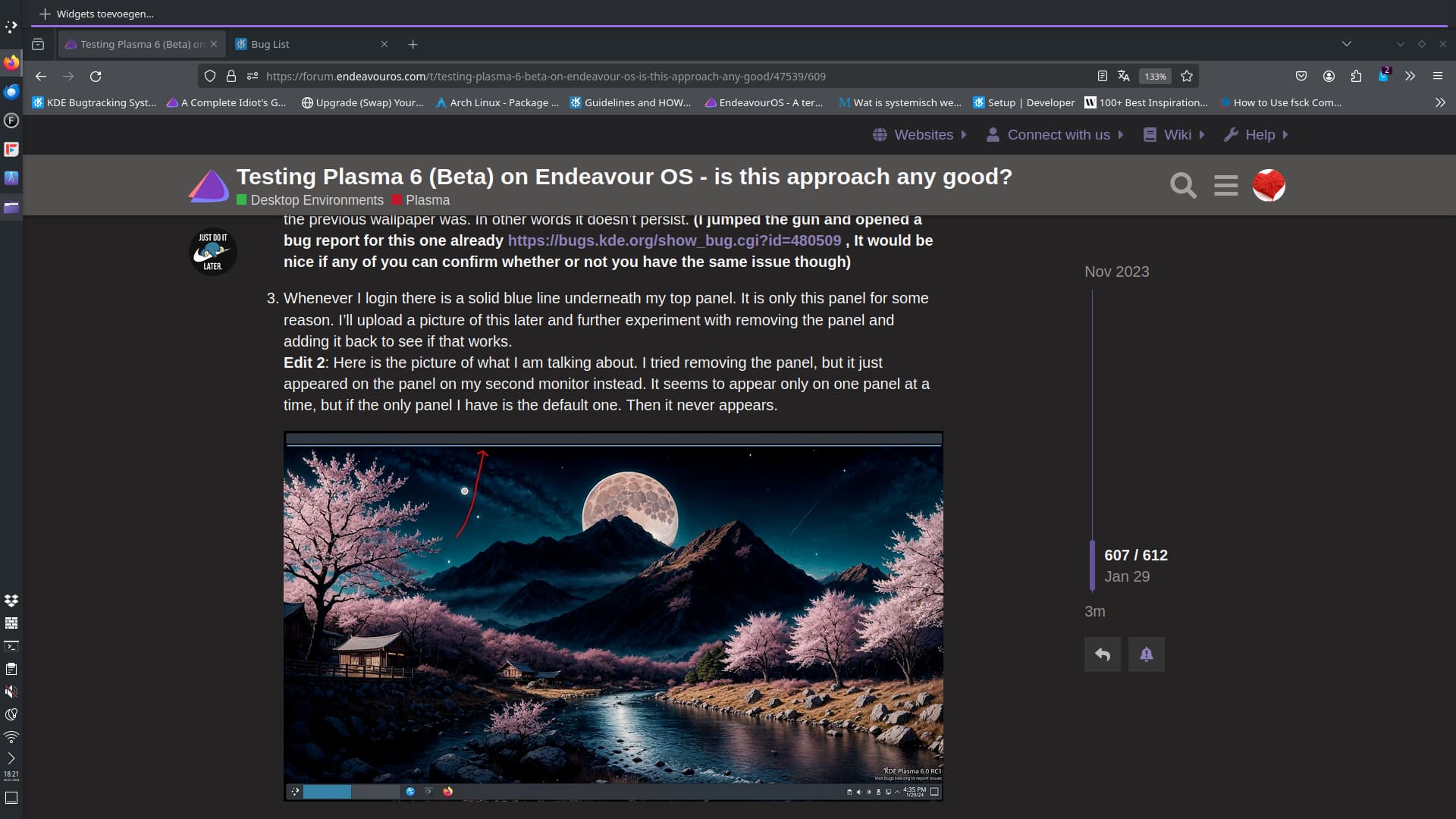
| Summary: | Random blue line underneath Plasma Panel on login | ||
|---|---|---|---|
| Product: | [Plasma] plasmashell | Reporter: | Dashon <dashonwwIII> |
| Component: | Panel | Assignee: | Plasma Bugs List <plasma-bugs-null> |
| Status: | RESOLVED FIXED | ||
| Severity: | normal | CC: | akselmo, dashonwwIII, dougshaw77, fanzhuyifan, nate, niccolo.venerandi, semlraug |
| Priority: | NOR | Keywords: | qt6 |
| Version First Reported In: | 5.92.0 | ||
| Target Milestone: | 1.0 | ||
| Platform: | Arch Linux | ||
| OS: | Linux | ||
| Latest Commit: | https://invent.kde.org/plasma/plasma-workspace/-/commit/db0ba010b943887652466cf2f1b8dec47ae47c75 | Version Fixed/Implemented In: | |
| Sentry Crash Report: | |||
| Attachments: | Random Blue Line | ||
|
Description
Dashon
2024-01-30 18:59:53 UTC
Created attachment 165361 [details]
Random Blue Line
I'm seeing the same thing on my setup, as can be seen here: https://forum.endeavouros.com/uploads/default/original/3X/3/9/390921519a6757dbe1e83887c3029fb6511071c9.jpeg Operating System: EndeavourOS KDE Plasma Version: 5.92.0 KDE Frameworks Version: 5.248.0 Qt Version: 6.7.0 Kernel Version: 6.7.2-arch1-1 (64-bit) Graphics Platform: offscreen Processors: 8 × Intel® Core™ i5-8250U CPU @ 1.60GHz Memory: 3.7 GiB of RAM Graphics Processor: Mesa Intel® UHD Graphics 620 Is the panel empty? What's on it? (In reply to Nate Graham from comment #3) > Is the panel empty? What's on it? The only thing on it is the global menu. Question: if you add an Analog Clock widget to that panel and reboot, does the issue still happen? (In reply to Nate Graham from comment #5) > Question: if you add an Analog Clock widget to that panel and reboot, does > the issue still happen? Even with the analog clock widget on the panel the blue line is still their after a reboot. Ok, thanks. (In reply to Nate Graham from comment #7) > Ok, thanks. No problem, let me know what else I can do. (In reply to Nate Graham from comment #7) > Ok, thanks. One thing I forgot to add to the description. Is that clicking anywhere causes that line to disappear. Are you using fractional scaling for your displays? Does the issue disappear if you use integral scaling? Sounds like this resolved bug, which I reported a while back but has worked for me since RC1. https://bugs.kde.org/show_bug.cgi?id=479379 (In reply to fanzhuyifan from comment #10) > Are you using fractional scaling for your displays? Does the issue disappear > if you use integral scaling? I am using fractional scaling, but setting the scale back to 100% and rebooting did not resolve the issue. (In reply to Doug from comment #11) > Sounds like this resolved bug, which I reported a while back but has worked > for me since RC1. > > https://bugs.kde.org/show_bug.cgi?id=479379 Yeah, it looks similar to this except it doesn't appear over the panel with the task manager. The highlight appears underneath my top panel which contains the global menu widget. If nothing is using the global menu at the time, then the panel looks empty. In my original post I described how the highlight only effects one of my three panels. Removing one panel will simply move the highlight to the next panel. If I recursively remove every panel except for the one that contains the task manager. Then the problem completely goes away. The panel with the task manager is the only panel to never be affected by the highlighting. (In reply to Dashon from comment #13) > (In reply to Doug from comment #11) > > Sounds like this resolved bug, which I reported a while back but has worked > > for me since RC1. > > > > https://bugs.kde.org/show_bug.cgi?id=479379 > > Yeah, it looks similar to this except it doesn't appear over the panel with > the task manager. The highlight appears underneath my top panel which > contains the global menu widget. If nothing is using the global menu at the > time, then the panel looks empty. In my original post I described how the > highlight only effects one of my three panels. Removing one panel will > simply move the highlight to the next panel. If I recursively remove every > panel except for the one that contains the task manager. Then the problem > completely goes away. The panel with the task manager is the only panel to > never be affected by the highlighting. I don't think the global menu is causing the problem. I have a global menu on the panel that was not being highlighted, and no global menu on the panel that was not. Sorry- I made a typo. The panel with the global menu was not highlighted. The panel without the global menu was the one getting a blue line. (In reply to Doug from comment #15) > Sorry- I made a typo. The panel with the global menu was not highlighted. > The panel without the global menu was the one getting a blue line. Yeah, I don't think what widgets are and aren't there matter. I just wanted to describe the contents of my panels. If I set the panel to autohide, then the issue goes away and it doesn't get passed to the next panel. (In reply to Nate Graham from comment #3) > Is the panel empty? What's on it? My top panel was empty; i had only added it see if i could reproduce the bug that was reported here. I can reproduce this at times when my screen goes off and plasmashell crashes (this was likely a qt 6.6 bug, and should be fixed in qt 6.7). Sometimes the panel just gets "active" and shows the blue line. Toggling kickoff or any other widget seems to fix it. Operating System: Fedora Linux 39 KDE Plasma Version: 6.0.80 KDE Frameworks Version: 6.0.0 Qt Version: 6.6.0 Kernel Version: 6.6.13-200.fc39.x86_64 (64-bit) Graphics Platform: Wayland Processors: 12 × AMD Ryzen 5 3600 6-Core Processor Memory: 15.5 GiB of RAM Graphics Processor: AMD Radeon RX 6600 (In reply to Akseli Lahtinen from comment #19) > I can reproduce this at times when my screen goes off and plasmashell > crashes (this was likely a qt 6.6 bug, and should be fixed in qt 6.7). > Sometimes the panel just gets "active" and shows the blue line. Toggling > kickoff or any other widget seems to fix it. > > Operating System: Fedora Linux 39 > KDE Plasma Version: 6.0.80 > KDE Frameworks Version: 6.0.0 > Qt Version: 6.6.0 > Kernel Version: 6.6.13-200.fc39.x86_64 (64-bit) > Graphics Platform: Wayland > Processors: 12 × AMD Ryzen 5 3600 6-Core Processor > Memory: 15.5 GiB of RAM > Graphics Processor: AMD Radeon RX 6600 I'm already on Qt 6.7, sorry. I thought I copied and pasted my info but I see now that I left it blank. I'll fix that in a bit. (In reply to Akseli Lahtinen from comment #19) > I can reproduce this at times when my screen goes off and plasmashell > crashes (this was likely a qt 6.6 bug, and should be fixed in qt 6.7). > Sometimes the panel just gets "active" and shows the blue line. Toggling > kickoff or any other widget seems to fix it. > > Operating System: Fedora Linux 39 > KDE Plasma Version: 6.0.80 > KDE Frameworks Version: 6.0.0 > Qt Version: 6.6.0 > Kernel Version: 6.6.13-200.fc39.x86_64 (64-bit) > Graphics Platform: Wayland > Processors: 12 × AMD Ryzen 5 3600 6-Core Processor > Memory: 15.5 GiB of RAM > Graphics Processor: AMD Radeon RX 6600 Not sure about it being solved on qt6.7: I'm on arch/endeavouros, which uses QT6.7 already. (In reply to Akseli Lahtinen from comment #19) > I can reproduce this at times when my screen goes off and plasmashell > crashes (this was likely a qt 6.6 bug, and should be fixed in qt 6.7). > Sometimes the panel just gets "active" and shows the blue line. Toggling > kickoff or any other widget seems to fix it. > > Operating System: Fedora Linux 39 > KDE Plasma Version: 6.0.80 > KDE Frameworks Version: 6.0.0 > Qt Version: 6.6.0 > Kernel Version: 6.6.13-200.fc39.x86_64 (64-bit) > Graphics Platform: Wayland > Processors: 12 × AMD Ryzen 5 3600 6-Core Processor > Memory: 15.5 GiB of RAM > Graphics Processor: AMD Radeon RX 6600 Here is my system info: Operating System: EndeavourOS KDE Plasma Version: 5.93.0 KDE Frameworks Version: 5.249.0 Qt Version: 6.7.0 Kernel Version: 6.7.2-arch1-2 (64-bit) Graphics Platform: Wayland Processors: 16 × AMD Ryzen 7 5800X 8-Core Processor Memory: 62.7 GiB of RAM Graphics Processor: NVIDIA GeForce RTX 3080/PCIe/SSE2 Manufacturer: Micro-Star International Co., Ltd. Product Name: MS-7C95 System Version: 1.0 Git commit 3a9d993d7877f39b79b07326f05cc8d4932fe0ba by Vlad Zahorodnii. Committed on 05/02/2024 at 11:44. Pushed by vladz into branch 'master'. shell: Fix initial keyboard interactivity flag in PanelView M +1 -1 shell/panelview.cpp https://invent.kde.org/plasma/plasma-workspace/-/commit/3a9d993d7877f39b79b07326f05cc8d4932fe0ba Git commit db0ba010b943887652466cf2f1b8dec47ae47c75 by Vlad Zahorodnii. Committed on 05/02/2024 at 11:48. Pushed by vladz into branch 'Plasma/6.0'. shell: Fix initial keyboard interactivity flag in PanelView (cherry picked from commit 3a9d993d7877f39b79b07326f05cc8d4932fe0ba) M +1 -1 shell/panelview.cpp https://invent.kde.org/plasma/plasma-workspace/-/commit/db0ba010b943887652466cf2f1b8dec47ae47c75 |