| Summary: | [Wayland] Downscaled X11 Windows Look Blocky/Blurry | ||
|---|---|---|---|
| Product: | [Plasma] kwin | Reporter: | Eamonn Rea <eamonnrea> |
| Component: | multi-screen | Assignee: | KWin default assignee <kwin-bugs-null> |
| Status: | RESOLVED INTENTIONAL | ||
| Severity: | normal | CC: | kde, nate |
| Priority: | NOR | ||
| Version First Reported In: | 5.27.8 | ||
| Target Milestone: | --- | ||
| Platform: | Other | ||
| OS: | Linux | ||
| Latest Commit: | Version Fixed/Implemented In: | ||
| Sentry Crash Report: | |||
|
Description
Eamonn Rea
2023-10-26 02:15:48 UTC
 It's unrelated to being fractional. With apply scaling themselves, we pick one display and use that scale for both screens. If that matches you get native rendering. The other screen will be upscaled or downscaled.

Mixed DPI on X11 was not ever supported and can't be added.

You can override which scale we use for X11, there's also the workraround of running apps in gamescope to fix the scaling issues.
There's not much else we can do unfortunately. Sorry

>  - A similar issue is also present on text in the Overview effect, on displays with no scaling, text always appears pixelated.

That sounds unrelated, and fixable.
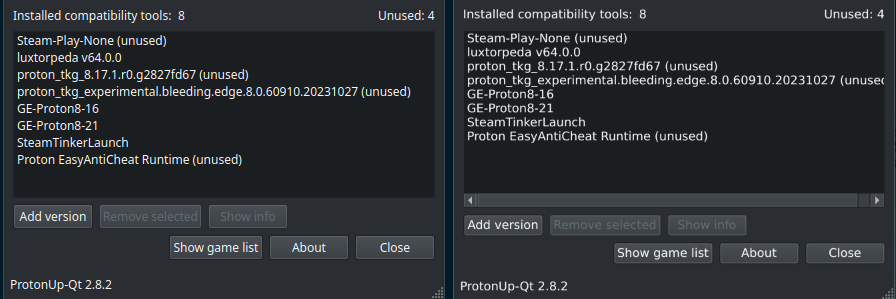
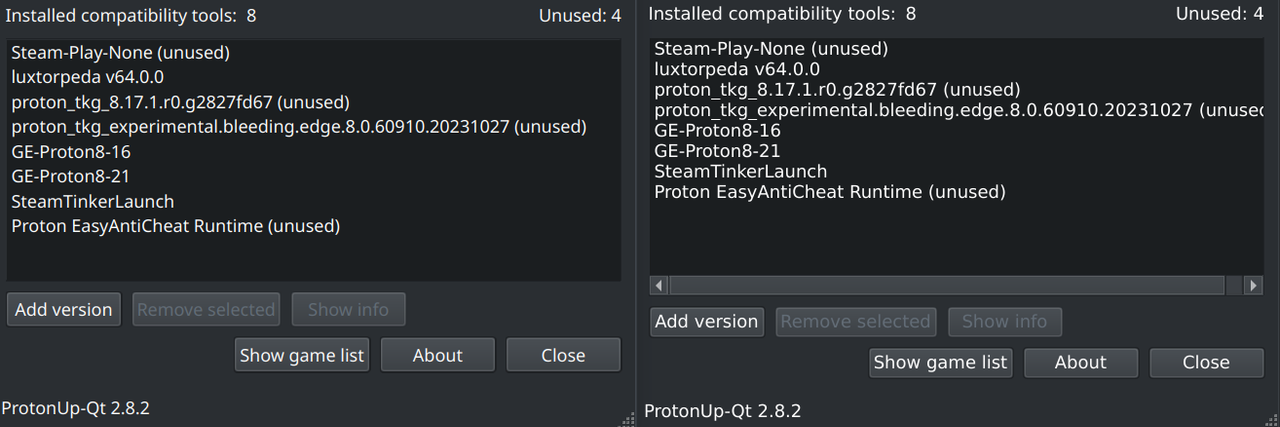
Could we run one XWayland server per screen, in the case where the screens have different scale factors? Maybe not worth the overhead, though. Sorry if I wasn't clear, I understand that X11 doesn't support mixed DPI. I wasn't referring to applications not scaling, I was referring to how they look visually when downscaled, is there no way to make these applications which are scaled up and then scaled down on non-scaled displays look any better visually? I am fine with applications which don't support scaling looking too small on unscaled displays, but applications which can be scaled up and moved to non-scaled displays should be filtered better in some way, no? The impact varies from application to application, for example with Steam it's generally ok, but with some other cases like Qt applications, text can be borderline-illegible when not on the display with the given scale factor. Many applications are now using Wayland, but two massive use-cases are not filled yet: The Steam Client, and games. Games running through Proton are fine because once Wine and then Proton gets Wayland support, this will be fine, but legacy games which may never get this kind of support, will consistently look blocky when downscaled. My post was not about adding mixed-scale support for X11, which is not feasible and not relevant to KDE specifically. What I was asking for is a way to make the apps which can be scaled up, look better when moved to displays which are not scaled. They match the scale factor just fine but their contents do not look visually appealing. In case I am still not being clear enough, as I am having some trouble knowing if I'm articulating the problem correctly, here's a visual representation of the issue. I hope it serves to show that while the window *sizing* is correct, the window contents look significantly worse when an X11 application is downscaled when the "Apply scaling themselves" option is used. https://i.postimg.cc/MZLqg6Fk/Screenshot-20231101-215050.png The example here is with a Qt6 application called ProtonUp-Qt. On the left is the program running using Wayland, running from source. On the right is the Flatpak version of the tool, running with the Wayland socket disabled so it's forced to use X11. The text looks significantly worse when downscaled, more blocky and sometimes even blurry in some programs. The issue is not specific to ProtonUp-Qt, it happens with any application I can apply scaling to. Heck, even without a scale factor applied, the applications do not simply look like they're running too small on unscaled displays, they are smaller when they can't apply scaling themselves, but they also still look a little bit blocky/blurry. When both the Wayland and X11 versions of the application are running on the scaled display, aside from some font differences as a result of one running from source and one running on Flatpak, they look virtually indistinguishable even when zooming in: https://i.postimg.cc/4xgdF4Yf/Screenshot-20231101-215645.png What I'm really hoping to illustrate here is that the window sizing isn't an issue, because applications can scale themselves just fine or have a flag I can set, but that when this flag is set, application *contents* is what looks off. Hope that makes sense! |