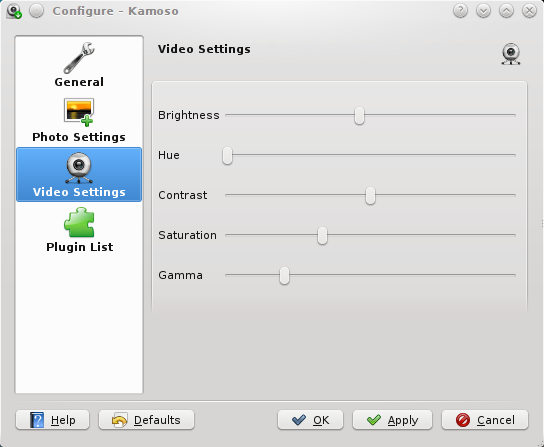
| Summary: | can't open video settings | ||
|---|---|---|---|
| Product: | [Applications] kamoso | Reporter: | Sérgio Basto <sergio> |
| Component: | general | Assignee: | Aleix Pol <aleixpol> |
| Status: | RESOLVED INTENTIONAL | ||
| Severity: | normal | CC: | eliadevito, nate, rdieter |
| Priority: | NOR | ||
| Version First Reported In: | 20.04 | ||
| Target Milestone: | --- | ||
| Platform: | Other | ||
| OS: | Linux | ||
| Latest Commit: | Version Fixed/Implemented In: | ||
| Sentry Crash Report: | |||
| Attachments: | Options button position | ||
|
Description
Sérgio Basto
2020-05-22 05:29:28 UTC
Version-Release number of selected component (if applicable): kamoso from Fedora kamoso-18.03.80-4.fc31 repo and kamoso updated to kamoso-20.04.1-2.fc31.x86_64 built on corp I'm testing it here: https://copr.fedorainfracloud.org/coprs/sergiomb/builds_for_Stable_Releases/package/kamoso/ with https://src.fedoraproject.org/rpms/kamoso/pull-request/1 it could be related to #422847, can you test a build with my patch? https://invent.kde.org/edevito/kamoso/-/commit/cd88623d21f571a94322dfb9c6c27996d8550188 I have builded a fedora package with this patch, you can find it on my corp repository: https://copr.fedorainfracloud.org/coprs/scorpionit/kamoso/ kamoso from copr:copr.fedorainfracloud.org:scorpionit:kamoso doesn't fix the issue Thanks for your efforts comparing yours output with mine the only difference is that I don't have this row: "file:///usr/lib64/qt5/qml/org/kde/kirigami.2/private/globaltoolbar/PageRowGlobalToolBarUI.qml:49:13: Unable to assign [undefined] to bool" at this point IMO this is a kf5-kirigrami2 bug that should be fixed in 5.70 release (version I currently have on my pc) if I am right, this should be fixed by this update: https://bodhi.fedoraproject.org/updates/FEDORA-2020-00e6a09bb1 I have updated but now icon of settings on the left has disappeared . rpm -qf /usr/lib64/qt5/qml/org/kde/kirigami.2/private/globaltoolbar/PageRowGlobalToolBarUI.qml kf5-kirigami2-5.70.0-1.fc31.x86_64 kamoso qrc:/qml/Mode.qml:23:28: Invalid property assignment: string expected - Assigning null to incompatible properties in QML is deprecated. This will become a compile error in future versions of Qt. file:///usr/lib64/qt5/qml/org/kde/kirigami.2/private/globaltoolbar/ToolBarPageHeader.qml:44:9: QML ActionToolBar: Binding loop detected for property "actions" file:///usr/lib64/qt5/qml/org/kde/kirigami.2/private/globaltoolbar/ToolBarPageHeader.qml:44:9: QML ActionToolBar: Binding loop detected for property "actions" file:///usr/lib64/qt5/qml/org/kde/kirigami.2/private/globaltoolbar/ToolBarPageHeader.qml:44:9: QML ActionToolBar: Binding loop detected for property "actions" file:///usr/lib64/qt5/qml/org/kde/kirigami.2/private/globaltoolbar/PageRowGlobalToolBarUI.qml:113: TypeError: Cannot read property 'globalToolBarStyle' of null file:///usr/lib64/qt5/qml/org/kde/kirigami.2/private/globaltoolbar/PageRowGlobalToolBarUI.qml:58:17: Unable to assign [undefined] to QQmlListProperty<QObject> error debugMessage: No file name specified for reading. error on: "filesrc location=\"\" ! decodebin ! imagefreeze ! videoconvert ! identity name=last" "gstfilesrc.c(524): gst_file_src_start (): /GstPipeline:pipeline0/GstFileSrc:filesrc0" error debugMessage: No file name specified for reading. error on: "filesrc location=\"\" ! decodebin ! imagefreeze ! videoconvert ! bulge name=last" "gstfilesrc.c(524): gst_file_src_start (): /GstPipeline:pipeline1/GstFileSrc:filesrc1" (In reply to Sérgio Basto from comment #5) > I have updated but now icon of settings on the left has disappeared . > > rpm -qf > /usr/lib64/qt5/qml/org/kde/kirigami.2/private/globaltoolbar/ > PageRowGlobalToolBarUI.qml > kf5-kirigami2-5.70.0-1.fc31.x86_64 > > > > kamoso > qrc:/qml/Mode.qml:23:28: Invalid property assignment: string expected - > Assigning null to incompatible properties in QML is deprecated. This will > become a compile error in future versions of Qt. > file:///usr/lib64/qt5/qml/org/kde/kirigami.2/private/globaltoolbar/ > ToolBarPageHeader.qml:44:9: QML ActionToolBar: Binding loop detected for > property "actions" > file:///usr/lib64/qt5/qml/org/kde/kirigami.2/private/globaltoolbar/ > ToolBarPageHeader.qml:44:9: QML ActionToolBar: Binding loop detected for > property "actions" > file:///usr/lib64/qt5/qml/org/kde/kirigami.2/private/globaltoolbar/ > ToolBarPageHeader.qml:44:9: QML ActionToolBar: Binding loop detected for > property "actions" > file:///usr/lib64/qt5/qml/org/kde/kirigami.2/private/globaltoolbar/ > PageRowGlobalToolBarUI.qml:113: TypeError: Cannot read property > 'globalToolBarStyle' of null > file:///usr/lib64/qt5/qml/org/kde/kirigami.2/private/globaltoolbar/ > PageRowGlobalToolBarUI.qml:58:17: Unable to assign [undefined] to > QQmlListProperty<QObject> > error debugMessage: No file name specified for reading. > error on: "filesrc location=\"\" ! decodebin ! imagefreeze ! videoconvert ! > identity name=last" "gstfilesrc.c(524): gst_file_src_start (): > /GstPipeline:pipeline0/GstFileSrc:filesrc0" > error debugMessage: No file name specified for reading. > error on: "filesrc location=\"\" ! decodebin ! imagefreeze ! videoconvert ! > bulge name=last" "gstfilesrc.c(524): gst_file_src_start (): > /GstPipeline:pipeline1/GstFileSrc:filesrc1" The setting button shouldn't be on the left, but inside the right sidebar. I runned a clean install of f31 inside a virtual machine and I noted that with kf5 5.68 installed there is an "hamburger menu icon" on the left that don't do nothing, imo this icon shouldn't be there. All kamoso options are inside the "Configure Kamoso" page Created attachment 129313 [details]
Options button position
> I runned a clean install of f31 inside a virtual machine and I noted that > with kf5 5.68 installed there is an "hamburger menu icon" on the left that > don't do nothing, imo this icon shouldn't be there. > > All kamoso options are inside the "Configure Kamoso" page and https://userbase.kde.org/images.userbase/8/87/Kamoso-Settings.png doesn't exist any more ? Kamoso hasn't looked like that for a long time. What's the bug here? (In reply to Nate Graham from comment #9) > Kamoso hasn't looked like that for a long time. What's the bug here? So now kamoso doesn't let just adjust camera setting ? , so where I do that ? neither we have plugins ? If yes , sorry this is not a bug anymore , kamoso-20.04.2 seems is working as expect . Thank you for your time Yep, looks like those features were removed at some point. :( I wonder why. |